
ThePricer Media
  • Latest: When Is an Electric Car Actually Cheaper?
  • Cost Guides
  • News & Investigations
  • Daily Price Puzzle (60s)
  • Methodology
  • Press & Mentions
  • Contact
  • Click to open the search input field Click to open the search input field Search
  • Menu Menu
Tech, Gadgets

How Much Does It Cost to Repair a Water-Damaged Laptop?

Updated on July 5, 2026 | Written by Alec Pow
This article was researched using 9 sources. See our methodology and corrections policy.

Water-damaged laptop repair usually costs about $100 to $250 for a minor spill, cleaning, diagnostics, keyboard issue, trackpad issue, or limited corrosion cleanup. If liquid reaches the motherboard, logic board, display, battery, charging circuit, or internal storage, the repair can cost about $300 to $700+, and severe liquid damage or premium laptop repairs can reach $1,000 to $1,500+.

The old $40 to $110 estimate is too low for most real liquid-damage cases. That amount may cover a diagnostic fee, a simple cleaning, or a cheap keyboard job on an older laptop, but it will not usually cover board-level repair, MacBook liquid damage, data recovery, or a motherboard replacement.

The final price depends on what liquid was spilled, how quickly the laptop was powered off, whether it was charged or turned back on while wet, how far the liquid spread, the laptop model, part availability, warranty coverage, and whether you need data recovery in addition to repair.

Article Highlights

Jump to sections
  • Water-Damaged Laptop Repair Cost by Damag…
  • When Water-Damage Repair Stops Making Sen…
  • Do Immediately After Spilling Water on a …
  • Why Liquid Damage Is So Unpredictable
  • Minor Spill vs. Major Liquid Damage
  • Diagnostic Fees and Shop Labor
  • MacBook Water Damage Repair Cost
★ Prefer ThePricer on Google
  • Minor water-damage cleanup or diagnostics can cost about $50 to $150 (at $30 per hour, earning that amount would take about 1.7 to 5 hours of work, before taxes).
  • Keyboard or trackpad replacement after a spill often costs about $100 to $250.
  • Motherboard or logic-board repair can cost about $300 to $700+.
  • Severe liquid damage, premium laptops, or full board replacement can reach $1,000 to $1,500+.
  • AppleCare+ for Mac lists liquid damage under other accidental damage, with a $149 to $299 service fee.
  • Standard warranties usually do not cover accidental spills unless you bought accidental damage protection.
Damaged Laptop Repair Cost

Water-Damaged Laptop Repair Cost by Damage Type

Repair or service Typical cost What the price usually means
Diagnostic fee $50 to $100+ (about 1.7 to 3.3 hours of work at $30 per hour) Shop opens or tests the laptop to find what failed, usually before parts are quoted
Minor liquid cleanup $100 to $250 Cleaning, drying, corrosion check, and limited internal cleanup when damage is not extensive
Keyboard replacement $100 to $250+ Common after coffee, tea, soda, or water spills through the keys
Trackpad, charging port, or small board repair $120 to $350+ Depends on whether the part is separate or attached to a larger top case or board
Screen or display assembly damage $150 to $600+ Liquid behind screen, damaged backlight, display cable, or full panel replacement
Motherboard or logic-board repair $300 to $700+ Board-level cleaning, corrosion repair, component replacement, or microsoldering
Motherboard or logic-board replacement $500 to $1,500+ More common when board-level repair is not practical or parts are expensive
Data recovery $250 to $550+ Separate recovery work if the laptop will not boot or storage is damaged
AppleCare+ Mac liquid damage $149 to $299 service fee Covered accidental damage fee if the Mac has active AppleCare+

Related guides

  • How Much Does It Cost to Fix a Tablet Screen?
  • How Much Does Cell Phone Charging Port Repair Cost?
  • How Much Does a MacBook Neo Cost?

When Water-Damage Repair Stops Making Sense

The most important question is not only “can this laptop be repaired?” It is “is the repair worth more than the laptop?” A $150 (about 5 hours of work at $30 per hour) keyboard and cleaning repair can make sense on most working laptops. A $600 motherboard repair is a much harder call.

As a simple rule, repair is usually worth considering if the total quote is less than about 40% to 50% of the laptop’s current replacement value and the machine is still modern enough to use for several more years. If a $700 laptop needs a $450 liquid-damage repair, replacement may be smarter. If a $1,800 MacBook or gaming laptop needs a $450 board-level repair, fixing it can still make sense.

Data changes the math. If the laptop contains important files that were not backed up, the first goal may be data recovery, not full laptop repair. Ask the shop to quote cleaning, parts, board repair, and data recovery separately before approving the job.

Do Immediately After Spilling Water on a Laptop

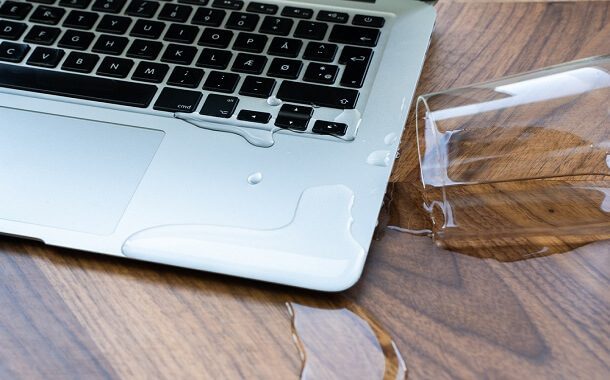
The first minute matters. Turn the laptop off immediately. Hold the power button if needed. Unplug the charger, remove USB devices, disconnect accessories, and stop using the laptop.

If the battery is removable, remove it. Many modern laptops have internal batteries, so do not force the case open unless you know what you are doing. If the battery is internal, the next best step is to keep the machine powered off and take it to a repair shop quickly.

Turn the laptop upside down in an open tent position if possible, so liquid drains away from the keyboard and board. Wipe visible liquid gently. Do not shake the laptop aggressively, because that can move liquid deeper into the machine.

Do not turn it back on “just to check.” Do not plug it in. Do not use a hair dryer, oven, heater, or rice bag. Heat can damage plastic, adhesive, keyboard layers, battery parts, and screen components. Rice can leave dust and starch inside the device without cleaning corrosion.

Why Liquid Damage Is So Unpredictable

Water damage does not depend only on how much water was spilled. A small amount of liquid in the wrong place can short the board, while a larger spill that is powered off immediately may be easier to clean.

Sweet, acidic, or sticky liquids are usually worse than plain water. Coffee, tea with sugar, soda, juice, alcohol, milk, and energy drinks can leave residue behind. Even after the laptop dries, that residue can corrode contacts or create electrical paths that should not exist.

iFixit warns that laptop liquid damage is not an easy repair and that even minor spills can require tools, experience, and proper cleaning on its liquid-damaged laptop guide. This is why waiting several days and turning the laptop back on can make the bill worse.

Minor Spill vs. Major Liquid Damage

A minor spill usually means the laptop was powered off quickly, only a small area got wet, and the liquid did not reach the motherboard or internal storage. In that case, repair may involve cleaning, inspection, and possibly a keyboard or trackpad replacement.

HomeAdvisor says laptops without extensive water damage may cost about $100 to fix, while laptops with a lot of water damage can exceed $250, and that a technician needs to open the laptop to provide a meaningful estimate, through its computer and laptop repair cost guide.

Major damage means the laptop will not power on, shuts off randomly, has no display, has keyboard or trackpad failure, smells burnt, has charging problems, shows battery issues, or has corrosion on the board. Those repairs usually move beyond simple cleaning.

Diagnostic Fees and Shop Labor

Most repair shops will not give a reliable liquid-damage quote without opening the laptop. The shop has to inspect the keyboard, top case, motherboard, connectors, battery, charging port, display cable, storage, and visible corrosion.

Best Buy says it repairs devices for a $84.95 flat-rate labor fee plus parts, and that the labor fee can be refunded in certain cases, such as when a repair is covered under a service contract or the device cannot be repaired because parts are unavailable, on its computer and tablet repair page.

Micro Center’s laptop screen replacement service lists labor at $99.99 and says the unit still needs to be tested before repair on its laptop screen replacement service page. Even when the visible symptom is a bad screen, liquid-damage diagnosis may uncover board or connector issues.

MacBook Water Damage Repair Cost

MacBook liquid damage can be much more expensive than a basic Windows laptop repair because many parts are compact, integrated, and model-specific. A spill may affect the keyboard, trackpad, Touch ID, display, battery, logic board, or storage.

AppleCare+ changes the cost. Apple lists Mac screen or external enclosure damage at a lower service fee and “other accidental damage,” including liquid damage, at a $149 to $299 service fee, depending on the Mac model, through its AppleCare+ page.

Without AppleCare+, Apple says service pricing depends on inspection and the final estimate. Apple Authorized Service Providers may also set their own fees. This is why the old claim that a Mac motherboard repair costs only $160 to $220 should not be used as the current answer.

Dell, HP, Lenovo, ASUS

For Windows laptops, the brand matters less than the damage type and part design. A cheap replaceable keyboard on one model may be affordable, while another model may require a full top-case or palm-rest assembly.

Dell says accidental damage coverage can be purchased for active-warranty systems to cover accidental damage, while basic support does not cover damage examples that require that extra protection, through Dell’s damage not covered by basic support page.

HP says damage that is not the direct result of a manufacturing defect may not be covered by the standard limited warranty on its standard warranty damage page. Lenovo similarly explains that customer-induced damage is not covered by the Lenovo Limited Warranty on its customer induced damage guide.

That means a brand-by-brand table can be misleading. A Dell, HP, Lenovo, ASUS, Acer, or MSI laptop may be cheap to fix if only the keyboard failed, but expensive to fix if the motherboard, battery, screen, or soldered storage is damaged.

Warranty, Accidental Damage Protection

Standard manufacturer warranties usually cover defects in materials or workmanship. They usually do not cover accidental spills, drops, cracked screens, or liquid damage unless you purchased accidental damage protection.

Check whether you bought AppleCare+, Dell Accidental Damage Service, HP Accidental Damage Protection, Lenovo Accidental Damage Protection, Geek Squad Protection, credit card purchase protection, renters insurance, or a school or employer device plan.

Coverage details matter. Some plans repair the laptop, some replace it, some reimburse you, some charge a service fee, and some have claim limits. Also check whether data recovery is excluded, because many protection plans cover hardware but not lost files.

Data Recovery Costs

If the laptop does not turn on, the most valuable part may be the data. Family photos, work files, school projects, business records, passwords, and tax documents can be worth more than the laptop itself.

Micro Center lists professional data recovery for drives up to 1TB at $249.99 and above 1TB at $549.99 on its data backup and recovery service page. More severe cases handled by specialized labs can cost more, especially when storage chips, encryption, or board damage are involved.

Ask the repair shop whether it will attempt data recovery before replacing the motherboard or reinstalling the operating system. If the data is critical, stop powering on the laptop and ask for a recovery-first plan.

What Parts Usually Fail?

The keyboard is one of the most common failure points because liquid usually enters from above. A keyboard may keep working for a few hours or days, then fail after corrosion or sticky residue builds up.

The trackpad, battery, speakers, display cable, charging port, fan, and small daughterboards can also fail. If the laptop powers on but the screen is dark, the issue may be the display, backlight, cable, board, or power circuit.

The motherboard or logic board is the expensive failure. If corrosion reaches the board, repair may require component-level cleaning, soldering, replacement chips, or a full board swap.

Repair vs. Replace

Repair is usually easier to justify on a newer laptop, a MacBook, a business laptop, a gaming laptop, or a workstation. These machines may cost $1,200 to $3,000+ to replace, so a $300 to $700 repair can still make sense.

Replacement may be smarter on an older budget laptop. If the laptop is worth $300 to $500 and the liquid-damage quote is $350, buying another machine may be the better long-term choice.

Compare the repair quote with the cost of a similar new or used laptop. If you are already considering replacement, see ThePricer’s guide to the cost of a laptop computer.

Three Realistic Cost Cases

Case 1: Minor water spill, no board damage. A student spills plain water, shuts the laptop down immediately, and takes it to a shop. The shop charges $85 for diagnostics and cleaning, and no parts are needed. The total stays under $100.

Case 2: Coffee spill through the keyboard. A customer spills coffee on a Windows laptop. The laptop still turns on, but several keys stop working. The shop charges $90 for diagnosis and cleaning and $160 for keyboard replacement. The total is $250.

Case 3: MacBook logic-board damage. A MacBook is powered on after a spill and later stops charging. With AppleCare+, the repair may fall under other accidental damage with a $149 to $299 service fee. Without coverage, the inspection may lead to a much higher out-of-warranty logic-board estimate.

Worked Example

Assume a 3-year-old laptop is worth about $700 used. A repair shop quotes $85 for diagnostics, $180 for keyboard replacement, and $120 for cleaning and corrosion treatment. The total is $385.

The repair is about 55% of the laptop’s current value. If the machine is otherwise fast, has a good battery, and contains important data, repair may still make sense.

Now assume the board is also damaged and the total quote becomes $750. At that point, replacement is usually smarter unless the laptop is a premium model or the data is worth recovering separately.

How to Lower the Repair Cost

Act quickly. The faster the laptop is powered off and professionally cleaned, the better the chance that the repair stays in the lower-cost range.

Ask for a written estimate before approving parts. The quote should separate diagnostic fee, cleaning, keyboard, screen, battery, motherboard, data recovery, tax, and labor.

Check coverage before paying cash. Accidental damage protection, AppleCare+, Geek Squad Protection, Dell or HP protection plans, credit card benefits, renters insurance, school device insurance, or employer coverage may reduce the out-of-pocket cost.

If the laptop is older, ask the shop whether data recovery plus replacement is smarter than full repair. Paying $250 to $550 to recover files may be better than spending $700 to revive a laptop that is near the end of its useful life.

What Not to Do After a Laptop Spill

  • Do not turn the laptop back on to test it.
  • Do not plug in the charger.
  • Do not put the laptop in rice.
  • Do not use a hair dryer, oven, heater, or direct sunlight.
  • Do not keep using the laptop just because it seems fine at first.
  • Do not approve a repair before asking whether data recovery is included or separate.

Related Laptop Repair Costs

Liquid damage can create several different laptop repairs at once. If the display fails, compare the quote with the usual laptop screen replacement cost. If the hinge or lid was damaged during a fall or while draining the laptop, compare that with laptop hinge repair pricing.

If the repair quote is close to replacement cost, compare it with the price of a new or refurbished laptop before approving board replacement. A repair that looks cheaper today can become expensive if the battery, screen, or keyboard fails later from the same spill.

What We Checked

  • Checked HomeAdvisor’s 2026 computer and laptop repair guide for minor and extensive laptop water-damage cost signals.
  • Checked Best Buy’s current computer and tablet repair page for the $84.95 flat-rate labor fee plus parts.
  • Checked AppleCare+ for Mac accidental damage service fees of $149 to $299 for other accidental damage such as liquid damage.
  • Checked Micro Center service pages for repair labor and data recovery examples of $249.99 and $549.99.
  • Checked Dell, HP, and Lenovo warranty language showing that accidental or customer-induced damage is generally outside standard warranty coverage unless extra protection was purchased.
  • Checked iFixit liquid-damage guidance for why powering on, waiting, or using simple drying myths can make damage worse.

Answers to Common Questions

How much does it cost to fix a water-damaged laptop?

It usually costs about $100 to $250 for minor water-damage cleaning or keyboard-level repairs. Board-level damage can cost about $300 to $700+, while severe liquid damage or premium laptop repair can reach $1,000 to $1,500+.

Can a laptop survive a water spill?

Yes, a laptop can survive a water spill if it is powered off quickly, unplugged, not charged, not turned back on, and cleaned before corrosion spreads. Survival depends on where the liquid went and whether power was applied while wet.

Does laptop warranty cover water damage?

Standard laptop warranties usually do not cover accidental spills. Water damage may be covered only if you bought accidental damage protection, AppleCare+, Geek Squad Protection, or another plan that specifically covers liquid damage.

How much does MacBook water damage repair cost?

With AppleCare+, Mac liquid damage usually falls under other accidental damage with a $149 to $299 service fee depending on the model. Without AppleCare+, Apple or an authorized provider must inspect the Mac and provide a quote, which can be much higher.

Should I put a wet laptop in rice?

No. Rice does not clean corrosion or residue inside the laptop and can introduce dust or starch. Powering off, unplugging, draining, and professional cleaning are safer steps.

Is it worth repairing a water-damaged laptop?

It is usually worth considering if the quote is less than about 40% to 50% of the laptop’s current value, the device is still modern, and the data is backed up or recoverable. If a cheap older laptop needs a motherboard repair, replacement may be smarter.

Disclosure: Educational content, not financial advice. Prices reflect public information as of the dates cited and can change. Confirm current rates, fees, taxes, and terms with official sources before purchasing. See our methodology and corrections policy.

by Alec Pow
ThePricer cost research Independent price research used by media, universities and public institutions.

We research provider pricing, market examples, buyer reports, hidden fees and public records.

Methodology · Citations · Newsroom
© 2014 - 2026 - ThePricer Media, LLC, 4 Grove Street, New York, NY, 10014, Phone: (212) 431-2441
We don’t use affiliate links or paid placements. All sources are cited only for verification.
  • Link to X
  • Link to LinkedIn
  • Link to Facebook
  • Link to Instagram
  • Link to Pinterest
  • Link to Youtube
  • Contact Us
  • About Us
  • Press & Mentions
  • Careers
  • Meet the Founder
  • Privacy Policy
  • Editorial Ethics
  • Methodology
  • Corrections
  • Disclosure
  • Terms and Conditions
Scroll to top Scroll to top Scroll to top