
How Much Does a Password Manager Cost?
Updated on | Written by Alec Pow
This article was researched using 10 sources. See our methodology and corrections policy.
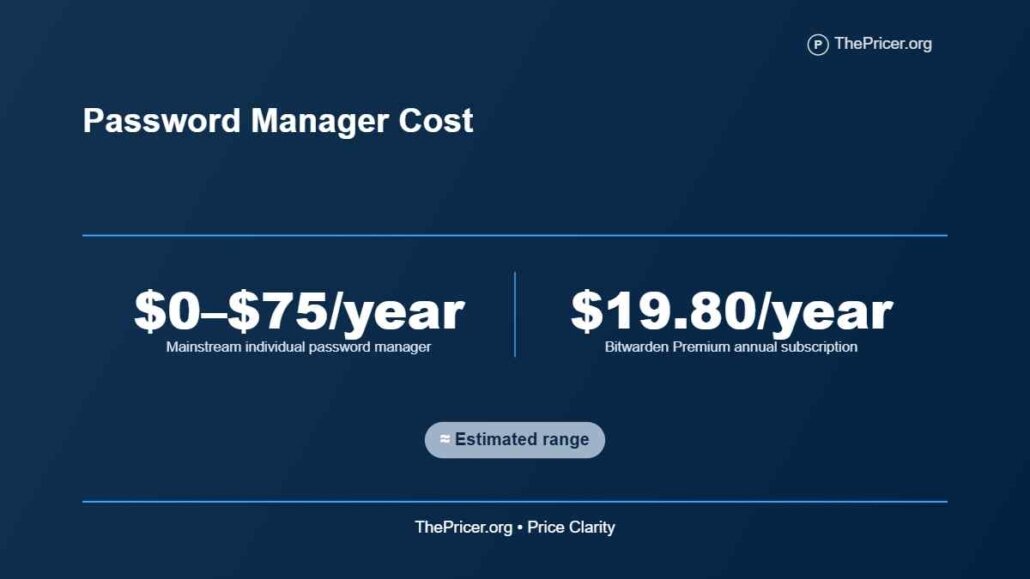
A password manager costs $0 to about $75 per year for an individual using a mainstream consumer plan, while paid family subscriptions commonly cost approximately $48 to $90 per year.
Some security bundles and business subscriptions cost more. These are U.S. pricing benchmarks, not a guaranteed range for every provider.
Free password managers can store, generate, and autofill credentials without a recurring charge. Paid plans add features such as encrypted file attachments, emergency access, advanced sharing, integrated authentication codes, and security monitoring. The actual bill depends on the provider, annual versus monthly billing, promotional discounts, and the number of users.
The most important distinction is between the first-year offer and what the subscription costs when renewed. A low advertised monthly equivalent often requires paying for an entire year in advance.
Article Highlights
Jump to sections
- Bitwarden Premium costs $19.80 annually, while its six-user Families subscription costs $47.88 annually.
- 1Password Individual costs $35.88 for the promotional first year, compared with a regular annual price of $47.88.
- 1Password Families has a promotional annual cost of $53.88, rising to a regular $71.88.
- Free Bitwarden and Proton Pass accounts can handle unlimited passwords across multiple devices.
- Family plans should be compared by their actual number of users, not just the advertised number of seats.
- Automatic renewal, duplicate subscriptions, and losing premium features after cancellation can affect the real cost.
How Much Does a Password Manager Cost?
The table below uses published U.S. annual subscription prices where they could be confirmed directly. Promotional and regular prices appear separately rather than being mixed into a single annual average.
| Provider and plan | Annual price | Scope |
|---|---|---|
| Bitwarden Free | $0 | One user, unlimited devices |
| Bitwarden Premium | $19.80 | One user |
| Bitwarden Families | $47.88 | Up to six users |
| 1Password Individual | $35.88 introductory, $47.88 regular | One user |
| 1Password Families | $53.88 introductory, $71.88 regular | Five included users |
| Proton Pass Free | $0 | One user, unlimited devices |
| Apple Passwords | $0 additional subscription | Supported Apple devices |
Bitwarden’s published personal subscription prices show Premium at $1.65 monthly when billed annually, or $19.80 per year. Families costs $3.99 monthly on annual billing, totaling $47.88. The advertised prices exclude taxes.
On the 1Password personal pricing page, the current introductory promotion reduces Individual from $3.99 to $2.99 monthly with annual billing. Families falls from $5.99 to $4.49 monthly. The discount is intended for eligible new direct subscribers during their first year.
Other providers, including Keeper, NordPass, and Dashlane, also sell personal plans. Their checkout promotions and renewal terms need to be assessed individually. A lower first-year price does not establish a lower lifetime subscription cost.
Free Plans
Paying for a password manager is optional for many individuals. Several reputable free products provide the core function of storing unique credentials and automatically filling them into websites and apps.
Bitwarden offers an unlimited-password free tier with synchronization across devices. Its personal and family feature comparison shows that paid subscriptions primarily add integrated authentication, file storage, emergency access, and broader household-sharing features.
Proton Pass also provides free password and passkey storage across unlimited devices. Paid features include integrated two-factor authentication codes, expanded encrypted sharing, additional email aliases, and dark-web monitoring.
Apple includes password management within its operating systems. Its Passwords application documentation describes storing credentials, passkeys, and verification codes with synchronization through iCloud Keychain.
The free option is not automatically less secure because it lacks a subscription price. The relevant questions involve encryption design, update support, authentication, recovery options, and whether the product works across all devices a person actually uses.
Premium Features
 Paid password managers generally sell additional convenience, administration, and account-protection features rather than simply increasing the number of passwords that can be stored.
Bitwarden Premium adds encrypted attachments, an integrated authenticator, emergency access, and vault-health reports. Its free plan already handles basic storage and synchronization, so a person who needs only those functions may gain little from upgrading.
Proton’s plan feature documentation distinguishes the basic free account from Pass Plus, which adds unlimited hide-my-email aliases, advanced sharing, and additional authentication tools.
Dashlane includes a VPN for the individual Premium subscriber. Its personal plan feature comparison shows that a Friends & Family subscription covers ten accounts, although VPN access is limited to the plan manager.
That distinction can change the value calculation. Ten people receiving password storage are not necessarily receiving ten identical copies of every bundled service.
Independent assessment also matters. WIRED’s August 2026 password-manager comparison evaluates free and paid products based on usability, security, and features. Its coverage provides a useful counterweight to promotional claims made on vendor pricing pages.
Family Subscription Economics
Family plans are particularly attractive when several people need separate premium accounts and a way to share selected household credentials securely.
Bitwarden Families includes up to six premium accounts at $47.88 annually. With six active users, that equals $7.98 per person per year. With three active users, the effective cost is $15.96 per person.
There is a useful break-even point. Two separate Bitwarden Premium subscriptions cost $39.60 annually, less than the family plan. Three separate subscriptions cost $59.40, which is $11.52 more than Families.
Therefore, at current direct prices, a Bitwarden family subscription becomes cheaper than buying separate Premium subscriptions at three users. This calculation assumes each person actually needs Premium and that the subscriptions provide comparable desired features.
1Password’s current regular Families price is $71.88 annually. Dividing that cost among five included users produces approximately $14.38 per person. The provider also offers family administration and shared vaults, which may justify the price difference for some households.
Proton Pass offers a six-user family subscription with premium features and private or shared vaults. Its publicly retrieved pricing widget did not expose a reliable current checkout amount, so an exact 2026 price is not assumed here.
The cheapest plan per available seat is not always the cheapest plan for a household. Count the people who will use premium features before comparing annual totals.
Hidden Cost
Introductory subscription pricing can make a password manager appear less expensive than it will be over several years.
Consider 1Password Individual. The introductory annual payment is $35.88, while its regular annual price is $47.88. Assuming the first-year promotion is followed by four years at the current regular rate, a five-year subscription totals $227.40, before tax.
Buying five years at the promotional price would incorrectly produce a figure of $179.40. The difference is $48, or about 27% of that understated estimate.
The corresponding 1Password Families calculation is also substantial. One introductory year at $53.88 followed by four years at $71.88 totals $341.40. Assuming the introductory rate lasts all five years would understate that amount by $72.
These are conditional calculations using the currently advertised regular rates, not predictions that renewal prices will remain unchanged through 2031.
Payment channel matters. 1Password limits its advertised new-customer promotion to qualifying direct subscriptions rather than purchases through third-party mobile app stores. Taxes and future price adjustments can further change the eventual charge.
Automatic renewal also deserves attention. The Bitwarden cancellation policy states that paid features remain available until the subscription period ends after cancellation, while the account reverts to free functionality afterward.
Do not cancel without checking the effect on shared vaults, stored attachments, authentication codes, and access arrangements. Export or migrate important information before losing the feature that makes it accessible.
Business Password Manager Costs
Business plans differ from personal subscriptions because an organization may need administrator controls, onboarding and offboarding procedures, activity records, and integration with its existing identity system.
Bitwarden’s published pricing includes a Teams plan at $4 per user monthly, billed annually. That amounts to $48 per user per year, before tax.
A ten-person company would therefore budget $480 annually for this plan. A company with twenty paid users would budget $960 annually, assuming every user requires a seat and the listed rate remains applicable.
Enterprise plans may include further integration and administrative capabilities. Their value depends on the organization’s needs, rather than on password storage alone.
For a small company, the labor required to distribute credentials, remove access when employees leave, and manage shared accounts can matter more than a modest subscription price difference.
A personal family plan should not be treated as a direct substitute for business controls. The two products may use different licensing rights, account administration, and access-management structures.
First-Year Cost Example
Consider a four-person household choosing between Bitwarden Premium and Families. All four members want premium features, but they do not need additional antivirus software or identity monitoring.
Four individual Premium subscriptions would cost $19.80 each, for a combined annual charge of $79.20.
One Bitwarden Families subscription would cost $47.88 annually, covering all four members. The household’s calculated first-year savings would be $31.32, excluding taxes.
The family subscription also provides shared collections and administration. Each person keeps a separate account, which is preferable to distributing a single master password among household members.
For a different purchasing scenario, one person choosing 1Password Individual would pay the current introductory $35.88. If that user later renews at the present regular annual rate, the combined two-year payment would be $83.76.
These scenarios reveal two different savings mechanisms. A family can reduce its total by combining eligible premium accounts under one subscription, while an individual can reduce long-term costs by comparing normal renewal rates rather than promotional checkout prices.
Security Costs Beyond the Subscription
A password manager protects credential storage and makes unique passwords easier to use. It does not replace malware protection, account recovery planning, or careful handling of phishing attempts.
Businesses and households sometimes already pay for a security suite that contains a password manager. Bitdefender’s higher subscription tiers include password-management functionality alongside antivirus and other services. The Bitdefender subscription cost comparison explains how bundled security tools can change the purchasing decision.
Duplicate spending is one hidden expense. Paying for both an independent password manager and an unused bundled one may offer little added value, although some users intentionally retain a separate provider for independence or better features.
Other security products are not interchangeable. Malwarebytes Premium pricing concerns device and malware protection, not simply storing account credentials. Buyers should compare the individual functions before eliminating a subscription.
Account recovery also requires planning. A forgotten master password, lost authentication device, or improperly configured recovery method can create substantial inconvenience even if the subscription itself is inexpensive.
Keep recovery codes in a secure location separate from the primary vault. Confirm how emergency access works before depending on another person to retrieve important accounts.
Choosing the Right Plan
The decision between free and paid password management should begin with the actual features missing from a free account, not an assumption that paid software automatically offers stronger encryption.
Makes sense if
- You need encrypted file storage, emergency access, or advanced authentication tools.
- Several family members need premium accounts and shared household vaults.
- You use multiple operating systems and want consistent autofill and synchronization.
- Your company needs administrator controls for staff credentials.
Does not make sense if
- A reputable free manager already handles your storage, autofill, and synchronization needs.
- You are paying for features bundled with another product you already own.
- You rarely use premium features but continue paying through automatic renewal.
- A family subscription leaves most of its paid seats unused.
Readers considering several subscriptions should compare their total annual software spending. The same principle applies to other recurring digital-service costs, where billing duration and bundled extras can change the effective price.
The strongest value is often a well-supported free manager or a modest premium subscription with a predictable renewal price. Selecting a trusted service and maintaining sound account-security practices matters more than choosing the most expensive tier.
Answers to Common Questions
Are password managers free?
Yes. Bitwarden, Proton Pass, Apple Passwords, and some browser-based tools provide password storage without a separate paid subscription. Their features and platform compatibility differ.
How much does a password manager cost monthly?
Current paid personal-plan benchmarks start around $1.65 per month when billed annually. A displayed monthly equivalent does not necessarily mean the provider offers month-to-month billing at that rate.
Is paying for a password manager worth it?
It can be worthwhile if you need emergency access, advanced sharing, authentication features, or encrypted attachments. Basic password storage does not automatically require a paid subscription.
Can family members share one password manager subscription?
Yes, with a family plan designed for multiple users. Each person should receive a separate account rather than share the same master password.
What happens if I stop paying?
It depends on the provider. Some subscriptions revert to a free tier, while others restrict premium features. Review export, sharing, and recovery options before canceling.
Disclosure: Educational content, not financial advice. Prices reflect public information as of the dates cited and can change. Confirm current rates, fees, taxes, and terms with official sources before purchasing. See our methodology and corrections policy.